// 01 the whole idea
You say it. It appears.
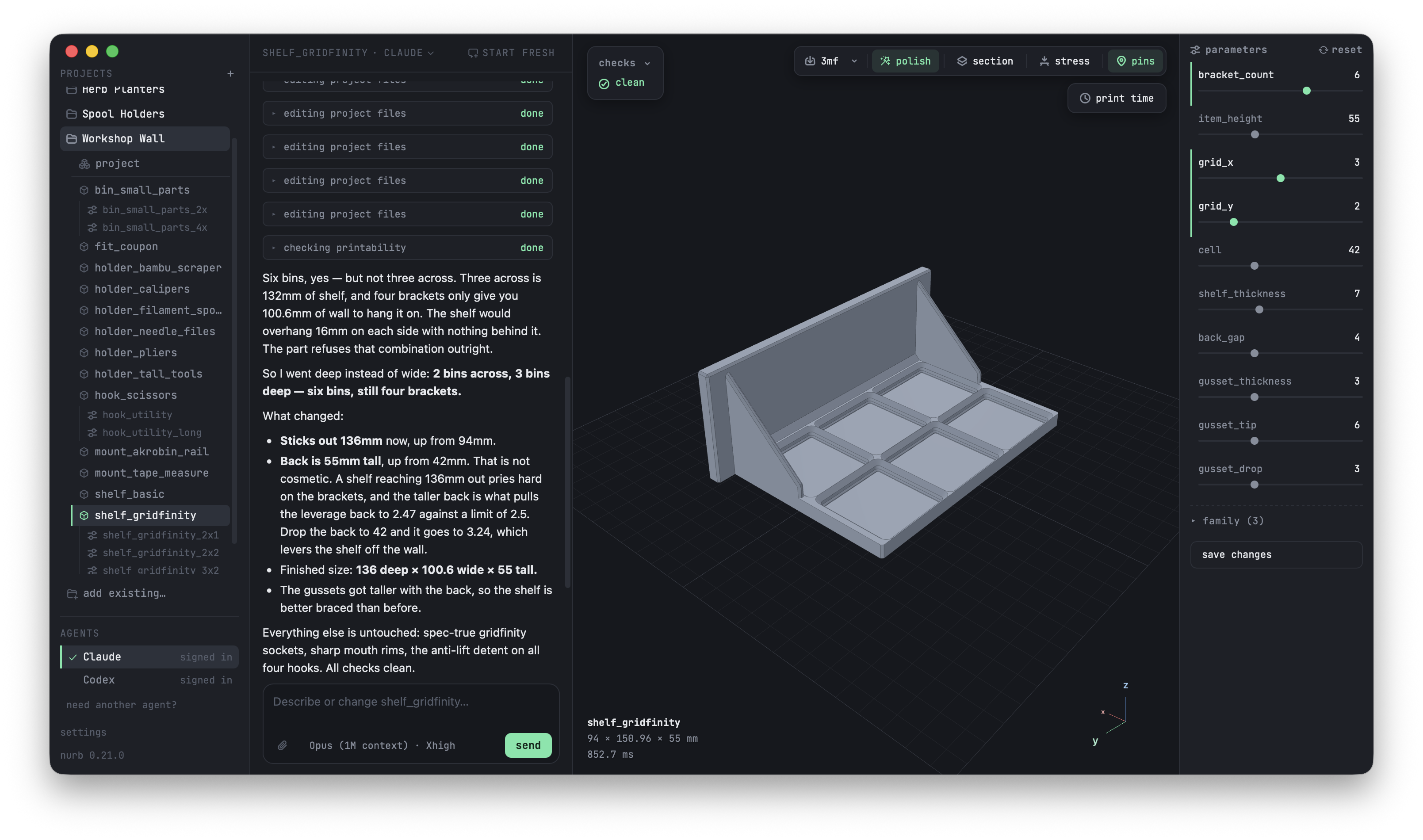
Your projects, the conversation, and the live viewer in one window. Every dimension the AI writes becomes a slider you can drag.
nurb gives the AI you already talk to real CAD skills. Say what you need, watch it take shape live, hit print.
Your projects, the conversation, and the live viewer in one window. Every dimension the AI writes becomes a slider you can drag.
Look at the part, say what's wrong with it. CAD software never opens.
Three things happen. You only do the first.
Calibrated on parts that really printed, and it knows which printer you own.
Some shapes don't come from numbers. Sweep the thing for ten seconds and your part gets built against its real contour.
A door can build clean, check clean, print beautifully, and still not open. Parts that work together get tested together.
The Mac app is the whole thing in one window. The command line works with Claude Code, Cursor, Codex, Copilot, and friends.
Your projects, your AI, and the live viewer side by side. It sets everything up the first time you open it and updates itself. Download for Intel Macs.
Rather work in the terminal? One paste installs nurb and teaches your AI how printable parts are designed:
$curl -fsSL https://nurb.dev/install.sh | shYour AI models it, checks it, and sends you a link to watch. Looks right? Print.